Переход с ASP.NET на Angular2 с особенностями (личный опыт)
Развернутая тема: разделение ASP.NET на Front-End (Angular) и Back-End (WebApi)
Особенности: корпоративная разработка (следовательно основной браузер — IE, веб сервер — IIS, среда — Windows); это частичный рефакторинг, а скорее редизайн веб части (имеется legacy код, ориентация на имеющийся UX);
Причины и цели: Цель — редизайн архитектуры веб составляющей (в текущей версии ASP.NET Forms + WCF), по причине невозможности/сложности решения возникших проблем и новых требований (полное обновление страниц после постбэка, повторная отправка формы, сложная навигация и связанные с этим проблемы с данными в формах).

Все описанное базируется на личном опыте (или, соответственно, его отсутствии — еще месяц назад о Node.js и Angular я не знал ничего кроме названия). Если краткое описание статьи заинтересовало — начнем.
В самый разгар поиска новой архитектуры (на тот момент пытался использовать ASP.NET MVC) мне попалось видео от channel9 “Building web apps powered by Angular 2.x using Visual Studio 2017 [1]” и его текстовая вариация [2]. Почитав параллельно официальный сайт Angular я проникся и начал пробовать, обнаружив следующие плюсы:
- Современная (кое-где даже чересчур) и популярная технология;
- Подходящий под VisualStudio (из-за Typescript) Front-End фреймворк;
- Модульная архитектура;
- Без особых трудностей написанная тестовая программа решала основные проблемы (в том числе которые я не мог решить с MVC).
Естественно нашлись и минусы:
- Мало нацелено на IE: ошибки в браузере лечатся с помощью polyfills/shim, но во время дебаггинга в консоли Visual Studio остаются постоянные исключения в javascript (вроде никак не влияющие на работу, но кто знает как это проявится при общем усложнении программы);
- Трудности при коммуникации с legacy частью (WCF сервис): Core и .NET Framework не полностью совместимы (в Core 2.0 обещают улучшить эту ситуацию);
- Дополнительные сложности/особенности развертывания в IIS;
- Готовая сложная конфигурация: непонятно что, как и почему работает, сложно модифицировать;
- (Из предыдущего пункта вытекает) привязка к версии и имеющейся конфигурации.
Так я начал читать, разбираться и наткнулся на простой шаблон проекта WebApi + Angular 2 [3] основанный на официальном руководстве Visual Studio 2015 QuickStart [4]. Оттолкнувшись от этого шаблона я начал модифицировать проект под себя (полностью с кодом можно ознакомится по ссылке на GitHub ниже):
- Убрал лишние npm пакеты — все что связано с тестированием (karma, protractor etc.) и не является необходимым для минимального старта;
- Обновил до Angular 4.x.
package.jsonИтоговый вариант
{ "name": "angular-quickstart", "version": "1.0.0", "description": "QuickStart package.json from the documentation for visual studio 2017 & WebApi", "scripts": { "build:prod": "webpack --config config/webpack.prod.js --colors --progress", "build": "webpack --colors", "build:vendor": "webpack --config config/webpack.vendor.ts --colors", "typings": "typings install" }, "keywords": [], "author": "", "license": "MIT", "dependencies": { "@angular/common": "^4.1.3", "@angular/compiler": "^4.1.3", "@angular/core": "^4.1.3", "@angular/forms": "^4.1.3", "@angular/http": "^4.1.3", "@angular/platform-browser": "^4.1.3", "@angular/platform-browser-dynamic": "^4.1.3", "@angular/router": "^4.1.3", "bootstrap": "^3.3.7", "core-js": "^2.4.1", "jquery": "1.12.4", "moment": "^2.18.1", "rxjs": "^5.4.0", "zone.js": "^0.8.12" }, "devDependencies": { "@types/node": "^6.0.46", "@types/core-js": "^0.9.41", "angular2-template-loader": "^0.6.2", "awesome-typescript-loader": "^3.1.3", "css-loader": "^0.28.4", "extract-text-webpack-plugin": "^2.1.0", "file-loader": "^0.11.1", "html-loader": "^0.4.5", "raw-loader": "^0.5.1", "script-loader": "^0.7.0", "style-loader": "^0.18.1", "typescript": "~2.3.4", "webpack": "^2.6.1", "webpack-merge": "^4.1.0" } } - Сменил systemjs на webpack с разделением всего кода на три пакета (vendor, polyfills, app) — пока без автоматической (пере-)сборки и “ускорялок” (полная сборка занимает 15сек на среднем ноутбуке)
webpack.config.jsCommon:
module.exports = {
    entry: {
        'polyfills': './app/polyfills.ts',
        'vendor': './app/vendor.ts',
        'app': './app/main.ts'
    },

    resolve: {
        extensions: ['.ts', '.js']
    },

    module: {
        rules: [
            {
                test: /.ts$/,
                use: [
                    {
                        loader: 'awesome-typescript-loader',
                        options: {
                            configFileName: helpers.root('', 'tsconfig.json')
                        }
                    },
                    {
                        loader: 'angular2-template-loader'
                    }
                ]
            },
            {
                test: /.html$/,
                use: [{
                    loader: 'html-loader',
                    options: {
                        minimize: false,
                        removeComments: false,
                        collapseWhitespace: false
                    }
                }]
            },
            {
                test: /.(png|jpe?g|gif|svg|woff|woff2|ttf|eot|ico)$/,
                loader: 'file-loader?name=dist/assets/[name].[hash].[ext]'
            },
            {
                test: /.css$/,
                exclude: helpers.root('app'),
                loader: ExtractTextPlugin.extract({
                    fallback: 'style-loader',
                    use: 'css-loader?sourceMap'
                })
            },
            {
                test: /.css$/,
                include: helpers.root('app'),
                loader: 'raw-loader'
            }
        ]
    },

    plugins: [
        new webpack.ProvidePlugin({ $: 'jquery', jQuery: 'jquery' }), // Maps these identifiers to the jQuery package (because Bootstrap expects it to be a global variable)
        // Workaround for angular/angular#11580 for angular v4
        new webpack.ContextReplacementPlugin(
            /angular(\|/)core(\|/)@angular/,
            helpers.root('./app'), // location of your src
            {} // a map of your routes
        ),

        new webpack.optimize.CommonsChunkPlugin({
            //order is important:
            //The CommonsChunkPlugin identifies the hierarchy among three chunks: app -> vendor -> polyfills.
            //Where Webpack finds that app has shared dependencies with vendor, it removes them from app.
            //It would remove polyfills from vendor if they shared dependencies, which they don't.
            name: ['app', 'vendor', 'polyfills']
        }),
    ]
};
Dev:
module.exports = webpackMerge(commonConfig, { devtool: 'source-map', output: { path: helpers.root('dist'), publicPath: '/', filename: '[name].js', chunkFilename: '[id].chunk.js' }, plugins: [ new ExtractTextPlugin('[name].css') ] }); - Попытался разобраться с IE и упомянутыми исключениями в VS: выяснил что webpack что то делает с shim/polyfill скриптами и если использовать ссылку на оригинальную версию исключения пропадают
index.html
<!DOCTYPE html> <html> <head> <title>Angular.io QuickStart</title> <base href=/ > <meta charset=UTF-8> <meta name=viewport content="width=device-width,initial-scale=1"> <link rel="stylesheet" href="./dist/vendor.css" /> </head> <body> <my-app>Loading App</my-app> <script src="node_modules/core-js/client/shim.min.js"></script> <!--<script src="node_modules/es6-shim/es6-shim.min.js"></script> <script src="node_modules/core-js/client/shim.js"></script> <script src="node_modules/zone.js/dist/zone.js"></script>--> <script type="text/javascript" src="./dist/polyfills.js"></script> <script type="text/javascript" src="./dist/vendor.js"></script> <script type="text/javascript" src="./dist/app.js"></script></body> </html> - Добавил bootstrap и jQuery;
- Усложнил структуру программы, стараясь следовать официальному гиду по стилю:
- Core-модуль для сервисов и единичных компонентов (например header.component);
- shared модуль для общих компонентов;
- пару feature модулей представляющих собой отдельные независимые области сайта.
screenshot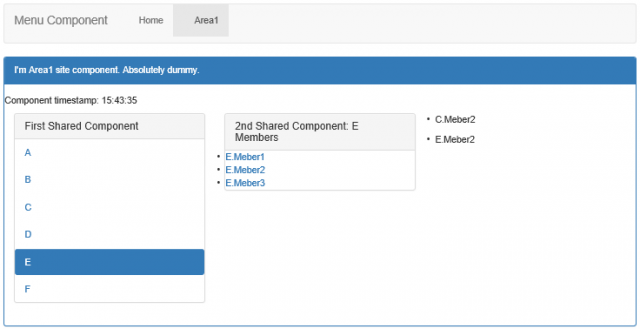
- Добавил WebApi контроллер и Angular сервис для общения с api
api.service.ts
@Injectable()
export class ApiService {
    private apiUrl: string;

    constructor(private http: Http) {
        this.apiUrl = "/api";
    }

    private setHeaders(): Headers {
        const headersConfig = {
            'Content-Type': 'application/json',
            'Accept': 'application/json'
        };

        return new Headers(headersConfig);
    }

    private formatErrors(error: any) {
        return Observable.throw(error.json());
    }

    get(path: string, params: URLSearchParams = new URLSearchParams()): Observable<any> {
        return this.http.get(`${this.apiUrl}${path}`, { headers: this.setHeaders(), search: params })
            .catch(this.formatErrors)
            .map((res: Response) => res.json());
    }

    //put(path: string, body: Object = {}): Observable<any> {
    //    return this.http.put(...);
    //}

    //post(path: string, body: Object = {}): Observable<any> {
    //    return this.http.post(...);
    //}

    //delete(path): Observable<any> {
    //    return this.http.delete(...));
    //}
}
Пример использования:
export class HomeSiteComponent { title = "I'm home-site component with WebApi data fetching"; public ctrlData: DummyData[]; constructor(apiService: ApiService) { apiService.get('/Dummier/Get').subscribe(result => { this.ctrlData = <DummyData[]>result; }); } } interface DummyData { clientData: string; serverData: string; } - Попробовал развернуть все в полноценном IIS — все работает. Вернул проект на IIS Express;
- Настроил маршрутизацию, добавив URL Rewrite Rules в Web.config. Теперь сервер принимает и обрабатывает api запросы и перенаправляет на Angular все остальные новые запросы. Сам же Angular отвечает за навигацию на стороне клиента (в том числе отвечает за “страницу 404”).
Routing
const routes: Routes = [
    { path: 'welcome', component: WelcomeComponent },       //Component w/o Menu item
    { path: 'home', loadChildren: () => HomeSiteModule },   //Feature Modul with own Routing
    { path: 'area1', loadChildren: () => Area1SiteModule }, //Feature Modul with own Routing
    { path: '', redirectTo: 'home', pathMatch: 'full' },    //Empty Route
    { path: '**', component: PageNotFoundComponent }        //"404" Route
];

@NgModule({
    imports: [RouterModule.forRoot(routes)],
    exports: [RouterModule],
})
export class AppRoutingModule { }
Web.Config:
<system.webServer>
   ...
    <rewrite>
      <rules>
        <rule name="WebApi Routes" stopProcessing="true">
          <match url="^api/" />
          <action type="None" />
        </rule>
        <rule name="Angular Routes" stopProcessing="true">
          <match url=".*" />
          <conditions logicalGrouping="MatchAll">
            <add input="{REQUEST_FILENAME}" matchType="IsFile" negate="true" />
            <add input="{REQUEST_FILENAME}" matchType="IsDirectory" negate="true" />
          </conditions>
          <action type="Rewrite" url="/" />
        </rule>
      </rules>
    </rewrite>
  </system.webServer>
Еще предстоит сделать:
- Автоматизировать сборку webpack;
- Разделить сборку на две части чтобы не пересобирать vendor пакет каждый раз;
- Добавить Windows аутентификацию;
- Перенаправить WebApi к существующему сервису WCF.
Итоговый проект можно найти на GitHub [5] (на момент написания статьи commit 74e54cf [6]).
С удовольствием отвечу на вопросы и подискутирую на тему «почему так, а не эдак».
Автор: Shwed_Berlin
Источник [7]
Сайт-источник PVSM.RU: https://www.pvsm.ru
Путь до страницы источника: https://www.pvsm.ru/net/257832
Ссылки в тексте:
[1] Building web apps powered by Angular 2.x using Visual Studio 2017: https://channel9.msdn.com/Events/Visual-Studio/Visual-Studio-2017-Launch/WEB-103
[2] текстовая вариация: https://blogs.msdn.microsoft.com/webdev/2017/02/14/building-single-page-applications-on-asp-net-core-with-javascriptservices/
[3] WebApi + Angular 2: https://github.com/Burgyn/Angular2VisualStudioTemplate
[4] Visual Studio 2015 QuickStart: https://angular.io/guide/visual-studio-2015
[5] GitHub: https://github.com/shwedberlin/AngularWebApi
[6] commit 74e54cf: https://github.com/shwedberlin/AngularWebApi/tree/74e54cf90a92dc261cb3ec7ef3a66928e8c20231
[7] Источник: https://habrahabr.ru/post/330860/?utm_source=habrahabr&utm_medium=rss&utm_campaign=sandbox
Нажмите здесь для печати.