Things you need to know should you want to switch from PHP to Python
Did you ever think that one day you had got into PHP web programming too quickly?
Several years have passed already, you have gained a lot of experience and can’t think of any other ways to work with web but PHP. Perhaps, you sometimes doubt the choice you have made, but are unable to confirm your doubts here and now. At the same time, you need real examples; you want to understand the changes that may occur in particular aspects of your work.
Today I will try to answer the following question: "What if we use Python instead of PHP?".
I have asked this question myself many times. I have been using PHP for 11 years already and am a certified PHP specialist. I have mastered it so it works just the way I want. I was really puzzled by several articles that criticized PHP severely (PHP: a fractal of bad design [1]). However, when chance came, I switched to Ruby and then to Python. Eventually, I chose the latter. Now I will try to explain how we Python guys live out there.
Article Format
The best way to learn a new language is to compare it to a language you can already apply, unless the new language differs drastically from the current one. An article on the Ruby web portal (Ruby from other languages [2]) provides such a comparison, however it lacks examples.
I should also note that this very article compares only aspects that draw your attention during the first weeks after switching to the new language.
Preparing Consoles
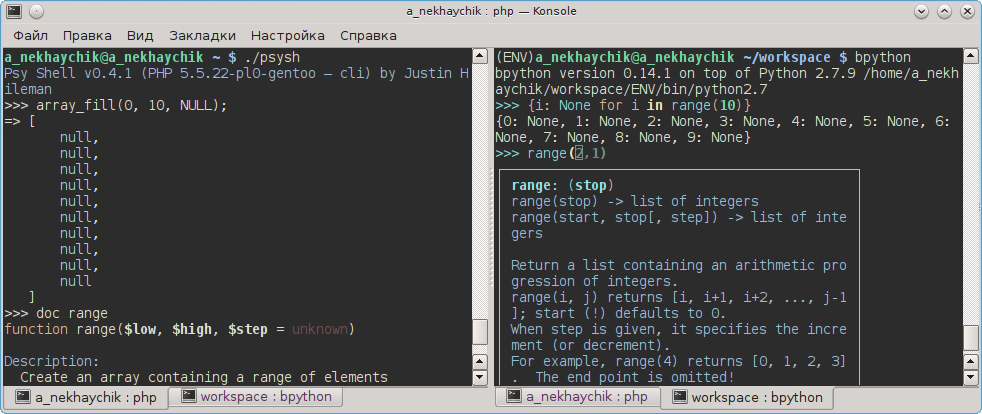
I’ve done my best to make this article interactive. Therefore, I recommend running all examples in the consoles when reading the article. You will need a PHP 5.3+ console, or you can use the PsySH console, which is even better:
php -aAnd a Python 2/3 console. I recommend using bpython or ipython, since they already feature code completion comparison with the default console integrated into the language. However, the following option is also applicable:
pythonAnd then:
import rlcompleter
import readline
readline.parse_and_bind("tab: complete")    # Enable autocomletion
import rlcompleter
import readline
readline.parse_and_bind("tab: complete")
Add few lines in ~/.bashrc file:
export PYTHONSTARTUP="${HOME}/.pyrc"
export PYTHONIOENCODING="UTF-8"
Adn to make changes immediatelly without re-login:
source ~/.bashrc
About languages
- Python is a language that features a strong duck dynamic typing (check Information on Typing [3]). Python is not limited in terms of its application. It is used for web development, daemons, scientific calculations, or as a language of extensions. Similar languages in terms of typing: Ruby.
- PHP is a language that features weak duck dynamic typing. PHP is a common-purpose language as well, however its application area mostly covers web and daemons. Other features are not worked out properly, making it non-applicable in production. Some people believe that PHP is meant to die [4]. Similar languages in terms of typing: JavaScript, Lua, Perl.
General Specifics
- Code is written in .py files regardless of the Python version. No opening tags like <?PHP are required, since Python was originally developed as a general-purpose programming language.
- Additionally, there is no php.ini for the same reason. There are two dozen
environment variables, however they are undefined in most cases (apart from PYTHONIOENCODING). In other words, there are no default connections to bases, error filter management, limit management, extensions, etc., which is natural for most general-purpose languages. As a result, programs behave in a similar way in most cases (their behavior does not depend on the favorite settings of your team lead). Settings like php.ini are stored in the main configuration file of an application in most cases. - A semicolon is not needed at the end of a string. However, if we put a semicolon there, it works like in PHP. Nevertheless, it is unnecessary and undesired, so you can simply forget about it.
- Variables do not start with $ (which PHP inherited from Perl that in turn adopted it
from Bash). - Assignment in cycles and conditions does not apply, so that no one mistakes comparison for assignment, which is a common mistake (as the language author believes). See PEP 572 [5] for python 3.8 if you need it.
- Upon parsing files, Python automatically puts the file copy with the .pyc extension (provided that your Python version is less than 3.3 and you have not installed PYTHONDONTWRITEBYTECODE [6]) in the same folder as your byte code is located. Then it always executes this very file, unless you change the source.
These files are automatically ignored in all IDEs and generally do not interfere. This feature can be perceived as a complete analog of PHP APC, considering that .pyc files will likely be located in the file cache memory. - Instead of NULL, TRUE, false we should use None, True, false (particularly in this case).
Nesting and Indenting
Here's something unusual: code nesting is determined with indents instead of brackets.
So, instead of:
foreach($a as $value) {
    $formatted = $value.'%';
    echo $formatted;
}
We should write the following:
for value in a:
    formatted = value + '%'
    print(formatted)
Wait, hold on! Don’t close the article. Here you might make the very mistake I made.
Once I believed that the idea of using indents for code nesting is ridiculous. My entire nature was protesting against it, since all developers write their code in their own way, regardless of different Style Guides.
Here's the mystery of the world: there's no indent issue. In most cases (99% of cases) indents are placed automatically by IDE as in any other language. You just don't think about it at all. I haven't faced any issue related to indents over 2 years of using the language.
Strong Typing
The next thing you should pay attention to is Strong Typing. However, some code first:
print '0.60' * 5;

print '5' == 5;

$a = array('5'=>true);
print $a[5];

$value = 75;
print $value.'%';

$a='0';
if($a) print 'non zero length';  // Will not print, common mistake
All the above examples are possible thanks to dynamic typing. However, the following will not work in Python:
>>> print "25" + 5
Traceback (most recent call last):
  File "<stdin>", line 1, in <module>
TypeError: cannot concatenate 'str' and 'int' objects
Usually data types will not be mixed in your code and this effect will not distract you. In general, when I coded on PHP, there were only a few situations per project when dynamic typing actually helped. In all other cases, variables of the same type interacted with each other.
Strong Typing affects error handling. For example, if an int function returns an integer, it cannot return None to a string, from which this type cannot be explicitly extracted. In this case, an Exception will be raised. It may require converting all the user's data to the needed data type, otherwise an exception will be raised in the Production version one day.
try:
    custom_price = int(request.GET.get('custom_price', 0))
except ValueError:
    custom_price = 0
It affects not only standard functions, but also some methods of the lists, strings, and some functions from additional libraries. Usually, a Python developer keeps in mind all exceptions that can be raised, and considers them. If the developer does not remember them, they check the library code. Of course, sometimes not all cases are considered, and users may cause exceptions in the Production version. Since this is a rare phenomenon, and usually Web-frameworks automatically send them to the administrator's mail, such cases are quickly fixed.
In order to use values of various data types within a single expression, they should be converted. There are functions for that: str, int, bool, long. Also, there are more convenient decisions for formatting.
Strings
Formatting
In PHP:
$tak = 'this_way';
echo "Currently you do it $this_way or {$this way}.";
echo "Or ".$this_way.".";
echo sprintf("However the following is possible: , %s or %1$'.9s.", $this_way);
Now you should learn to do it in a different way:
etot = 'this'
var = 'option'
print('To %s option' % etot)
print(etot + ' option can also be used, but not recommended)
print('Or to %s %s' % (etot, var))
print('Or to %(etot)s %(var)s' % {'etot': etot, 'var': var}) # Very useful for localization team
print('Or to {} {}'.format(etot, var))
print('Or to {1} {0}'.format(var, etot))
print('Or to {etot} {var}'.format(var=var, etot=etot))

# And finally
print(f'Or to {etot} {var}') # Starting from Python 3.6
There are more options and there is a convenient option for localizations.
String Methods
Python has something that is missing in PHP: built-in methods. Let's compare:
strpos($a, 'tr');
trim($a);
vs
a.index('tr')
a.strip()
And how often do you do something like that?
substr($a, strpos($a, 'name: '));
vs
a[a.index('name: '):]
Unicode Support
Finally, Unicode. In Python 2, all strings are NOT Unicode by default. (In Python 3, all strings are Unicode by default). However, when you add the character u at the beginning of a string, it automatically becomes Unicode. And then all built-in (and not built-in) string methods of Python will work properly.
>>> len('Привет мир')  # Hello world in Russian
19
>>> len(u'Привет мир')
10
In PHP natural Unicode processing was developing for PHP 6 but PHP 6 was cancelled (Andrei Zmievski: Waht happened to Unicode and PHP 6 [8]).
In PHP, by the way, you can use the MBString function overloading [9] to receive a similar effect but it is deprecated.
However, you will not be able to work with binary strings using overloaded functions, but you will still be able to work with a string as an array.

Raw strings
You should know the difference between single quoted strings and double quoted strings:
$a = 'Hello.n';
$a[strlen($a)-1] != "n";
The similar feature in Python has called raw strings. To use it place characted r before single quoted string.
a = r'Hello.n'
a[-1] != 'n'
Arrays
Now it is time for arrays. In PHP you could use integers or strings as keys:
var_dump([0=>1, 'key'=>'value']);
In PHP, arrays are not standard arrays (lists [10]), but associative arrays (dictionary [11]). Standard arrays are also available in PHP, they are SPLFixedArray [12]. They require less memory, potentially work faster, but due to the complexity of creating and extending, are rarely used.

In Python, four data types are used for an array:
- list
a = [1, 2, 3] # short form a[10] = 11 # Unexist indexes cannot be added. # > IndexError: list assignment index out of range a.append(11) # but you can adds an element to the end of a list. del a[0] # and delete the element using the index a.remove(11) # and also remove an element using its value - dict — dictionary. Dictionaries have no order of storing data (as they do in PHP).
d = {'a': 1, 'b': 2, 'c': 3} # short form d[10] = 11 # Random indexes can be added d[True] = False # And use any immutable types (integers, strings, booleans, tuples, frozen-sets) del d[True] # And delete using a key - tuple. Something like a fixed array of non-homogeneous values. Perfectly suited to returning several values from a function and for compact storage of configurations.
t = (True, 'OK', 200, ) # short form t[0] = False # Elements are immutable # > TypeError: 'tuple' object does not support item assignment del t[True] # Cannot be deleted using a key # > TypeError: 'tuple' object doesn't support item deletion t = ([], ) # However, nested mutable structures can be muted (lists, dictionaries, sets, bite arrays, objects) t[0].append(1) # > a == ([1], ) - set. Basically, this is a list of unique values that have no order of storing.
s = set([1,3,4])
s[0] = False  # sets do not support indexing
# > TypeError: 'set' object does not support indexing
s.add(5)  # adds an element
s.remove(5)  # deletes an element
# # Standard maths for sets
s | s  # Merge
s & s  # Intersection
s - s  # Difference
s ^ s  # Merge of unique elements
In PHP, arrays are kind of a Swiss army knife—they can serve all purposes. As for Python, you need to use data arrays that are native for Computer Science. Besides, you need to use appropriate data arrays for each single case. You may say that these are unnecessary difficulties that programmers should never face. Well, that's not the point.
- First: the possibility to choose between tuple, set, list, and dict does not make things difficult—it just becomes a subconscious habit like changing gears.
- Second: list or dict are used in most cases.
- Third: in most cases, when you need to store the key-value pair, the order is not essential, however, when you need to keep the order, in most cases there are only values instead of key-value pairs.
- Fourth: Python has an ordered dictionary — OrderedDict [13].
Imports
This is a very interesting feature. It's kind of an alternative concept of name spaces that must be used.
In PHP, you write require_once and it remains available until the end of the PHP execution session. Generally when using CMS, developers put everything into classes, place them in special locations, write a small function that know these locations, and register this function via spl_autoload_register at the beginning of the file.
In Python, however, each file has its own name space. As a result, a file will only contain objects you import there. By default, only the standard Python library is available (approximately 80 functions).
Check the example below:
Let's assume, you've created the tools/logic.py file:
def is_prime(number):
    max_number = int(sqrt(number))

    for multiplier in range(2, max_number + 1):
        if multiplier > max_number:
            break
        if number % multiplier == 0:
            return False

    return True
Now, you want to use it in the main.py file. In this case, you need to import either the entire file or the file entities you require in the target file you are working on.
from tools.logic import is_prime

print(is_prime(79))
This rule applies Python-wide. In most cases, when you start working on any file, you first need to import auxiliary Python objects into your file: your own and integrated libraries. It is as if PHP functions like mysqli_*, pdo_*, memcached_*, as well as your entire code, are stored in name spaces and you have to import them into each file you work with. What advantages does this approach have?
- First: different objects in different files can have identical names. However, it is you who selects the object, its name, and target file.
- Second: refactoring is much easier. You can always keep track of a class, function, or any other entity. Use a simple search to locate a function and see where/how it is used.
- Third: this feature makes developers think over the code structure (at least to some extent).
On the other hand, we can mention only one drawback — circular imports [14]. However, it is a rare issue. Besides, it is a familiar issue, and developers know the ways to resolve it.
Is it convenient to use imports all the time? It depends on your preference. If you like to have more control over the code, you will prefer using imports. Some teams even have rules that regulate the order of assigning external code, so as to minimize the amount of circular imports. If your team does not have such rules and you do not want to bother much, you can simply rely on IDE that will automatically import everything you use. In addition: imports are not a unique Python feature, they are also used in Java and C#.
There have been no complaints so far.
Parameters *args, and **kwargs in a Function
Syntax with default parameters is generally the same:
function makeyogurt($flavour, $type = "acidophilus")
{
    return "Making a bowl of $type $flavour.";
}
vs
def makeyogurt(flavour, ftype="acidophilus"):
    return "Making a bowl of %s %s." % (ftype, flavour, )
However, you may sometimes need a function for an unknown number of arguments.
For example, a proxy function, logging function, or function for receiving signals. In PHP, starting from version 5.6, the following syntax is available:
function sum(...$numbers) {
    $acc = 0;
    foreach ($numbers as $n) {
        $acc += $n;
    }
    return $acc;
}

echo sum(1, 2, 3, 4);
// or
echo add(...[1, 2, 3, 4]);
Respectively, in Python, you can add unnamed arguments into an array, and add named arguments into a dictionary:
def acc(*args, **kwargs):
    total = 0
    for n in args:
        total += n
    return total

print(acc(1, 2, 3, 4))
# or
print(acc(*[1, 2, 3, 4]))
Respectively, *args — list of unnamed arguments, **kwargs — dictionary of named arguments.
Classes
Have a look at the below code:
class BaseClass:
    def __init__(self):
        print("In BaseClass constructor")

class SubClass(BaseClass):
    def __init__(self, value):
        super(SubClass, self).__init__()
# or short form: super().__init__() starting from Python 3
        self.value = value

    def __getattr__(self, name):
        print("Cannot found: %s" % name)

c = SubClass(7)
print(c.value)
The main differences from PHP are as follows:
- self is used instead of $this, and methods are always called using the access operator ("."). Besides, «self» should always be the first argument in all methods (well, in most of them). The point is that Python provides all methods with a link to the object with the first argument (the object itself can be added to a variable with any name).
- As in PHP, there is an analog of magic names. Instead of __construct — __init__. Instead of __get — __getattr__, etc.
- new is not required. Creating a class instance is the same as calling a function.
- A more complex call to the parent method. As for super, you always need to keep all the details in mind. parent:: As for PHP, the structure is less bulky.
We should also mention the following:
- More than one class can be inherited.
- No public, protected, private. Python allows changing an instance structure (as well as the entire class) on the run via simple assignment, so no protection is necessary. Thus, Reflection is not required as well. However, there's an analog of the protected state — double underscore before the name. However, this operation simply changes the variable/method visible name into _%ClassName%__ %varname% that allows for working with hidden data.
- No static, final classes, and interfaces. The model is more object-based in Python in general. Instead of Singleton, you will likely have a file containing all the required functions or a file that returns the same instance upon importing. Instead of interface, you will likely create a class that raises exceptions for methods that are not reassigned for some reason (i.e. workaround are possible).
- It is not desired to apply only object-oriented programming (OOP). Since everything is an object anyway (even bool) and syntax has no different operators for calling a method or function from an imported file, all calls are performed with the access operator ("."). Thus, encapsulation does not necessarily require OOP. Therefore, in most projects, classes are created where they are really required.
Coding Style
I've worked on several long-term projects and noticed that all team members have a different coding style. In many cases, a code can help identify the code author. I've always wanted any code style standard to be adopted for the purpose of consistency.
However, there have always been many arguments when approving this document within the team. This issue affects Python as well, but to a lesser extent, since there are several recommendations from qualified specialists, which will definitely be enough to start with:
ul>
PEP 8 [15]. Recommendations from the Python development team and the utility check program of the same name.
Recommendations from Google. [16]
Furthermore, there is a so-called Zen of Python. One of its rules states that «There should be one-- and preferably only one --obvious way to do it.» Thus, a code cannot be written in several approximately similar ways. Of course, that's idealism, but it helps in many cases:
- Instead of a large stock library [17] containing several functions that partially duplicate each other, we use a smaller set of methods and additional integrate libraries (for example for hash totals).
- Instead of strlen and count, we always use len.
etc.
Python Versions
New versions of PHP are always backward compatible with previous ones, though sometimes improvements are required. On the other hand, there is Python 2 and Python 3 They are incompatible little bit by default. However, recently, Python developers have improved the situation significantly. You can write a code for two Python versions, but if you use new Python 3 features like asynchronous programming or new Unicode features (UTF 8), you'll likely face difficulties. Because of this, projects that have already been developed and coded for several years, still use Python 2.
But for new projects there is no reason to use Python 2.
Cross languages aliases
Below is the list of key words that explain the alternative Python provides to the technology you are currently using.
- composer -> pip
- mod_php -> mod_wsgi
- nginx + php-fpm -> nginx + uwsgi + uwsgi_python
- daemon.io -> tornado, twisted
- Zend Framework -> Django
- Phalcon -> falcon
Conclusion
How do you know if you need it or not?
- You believe that the stronger the typing the better.
- You prefer a language that features a well-organized architecture.
- You are a perfectionist, excessive diversity annoys you.
- Python job positions in your city look more promising (or you've got bored of developing only web portals).
- You want your main programming language to be suitable for developing any kind of software (considering the reasonable restrictions related to dynamic typing).
- You do not like the skill level of junior developers (due to the relatively low learning curve).
My Way to Learn Python
If you are an experienced developer, you will need up to three weeks to learn it without putting in too much effort.
- First week: Read Dive Into Python [18], Chapters 2—7. You can look through other chapters briefly, paying attention to interesting points only. At the same time, complete 10 tasks with Project Euler [19]. Finally, create a console utility that accepts parameters. You can either port any of your previous bash scripts, or create an analog of ls from BusyBox [20], or something new. The point is that the script should do something useful, something you do frequently. For example, I've ported my PHP utility [21] that can display data in the memory cache.
- Second week: Create a simple analog of Medium [22] in Django and gun on any hosting. Mind the components: registration, login, password recovery, sharing posts and comments and removing them, checking permissions for actions.
- Third week: Select a company you would like to work for, send them your CV asking for a Python test task to test your skills.
Good luck!
Автор: gnomeby
Источник [23]
Сайт-источник PVSM.RU: https://www.pvsm.ru
Путь до страницы источника: https://www.pvsm.ru/python/305332
Ссылки в тексте:
[1] PHP: a fractal of bad design: https://eev.ee/blog/2012/04/09/php-a-fractal-of-bad-design/
[2] Ruby from other languages: https://www.ruby-lang.org/en/documentation/ruby-from-other-languages/
[3] check Information on Typing: https://en.wikipedia.org/wiki/Type_system
[4] PHP is meant to die: https://software-gunslinger.tumblr.com/post/47131406821/php-is-meant-to-die
[5] PEP 572: https://www.python.org/dev/peps/pep-0572/
[6] PYTHONDONTWRITEBYTECODE: https://docs.python.org/3.6/using/cmdline.html#envvar-PYTHONDONTWRITEBYTECODE
[7] it is by design: https://docs.python.org/3/library/stdtypes.html#bltin-boolean-values
[8] Andrei Zmievski: Waht happened to Unicode and PHP 6: http://zmievski.org/files/talks/phpcomcon-2011/what-happened-to-unicode-and-php-6.pdf
[9] MBString function overloading: http://php.net/manual/en/mbstring.overload.php
[10] lists: https://en.wikipedia.org/wiki/List_(abstract_data_type)
[11] dictionary: https://en.wikipedia.org/wiki/Associative_array
[12] SPLFixedArray: http://php.net/manual/en/class.splfixedarray.php
[13] OrderedDict: https://docs.python.org/3.6/library/collections.html#collections.OrderedDict
[14] circular imports: https://stackoverflow.com/questions/744373/circular-or-cyclic-imports-in-python
[15] PEP 8: https://www.python.org/dev/peps/pep-0008/
[16] Recommendations from Google.: http://google-styleguide.googlecode.com/svn/trunk/pyguide.html
[17] large stock library: http://php.net/manual/en/ref.strings.php
[18] Dive Into Python: https://linux.die.net/diveintopython/html/
[19] Project Euler: https://projecteuler.net
[20] BusyBox: https://busybox.net/downloads/BusyBox.html
[21] my PHP utility: https://github.com/gnomeby/memcached-itool
[22] Medium: https://medium.com
[23] Источник: https://habr.com/ru/post/436180/?utm_campaign=436180
Нажмите здесь для печати.